
READ THE INSTRUCTIONS CAREFULLY
Installation Instructions
The download will be very fast. On completion you will more than likely receive options to
When you run iauctionpro.exe
The download will be very fast. On completion you will more than likely receive options to
- Run or Open or Open File
Always select this option. - Save and/or Save As
If you are a seasoned computer veteran you can choose to do this. You will be responsible to unblock iauctionpro.exe before you run it otherwise it will never execute.
When you run iauctionpro.exe
- It will download and launch the installer.
Downloading can take a few minutes depending on the speed of your Internet connection. - Select the Type Of Installation
The default is pre-set to Server. This will install all required files as well as a database. You MUST have ONE server installation. This is usually done on your most powerful machine, which we call the database host or server. If installing on any other machine please use a Workstation type of installation. Such installations do NOT install a database and will connect to the database host or server machine. - Walk through the installer.
- On the desktop you will find a shortcut called iAuction Pro
- Right click on it
- A pop up menu appears
- iAuction Pro must run as administrator.
There are two ways you can do this.
1. Select 'Run as administrator' like this:
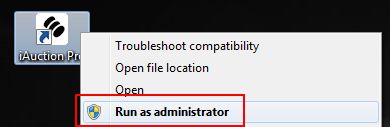 iAuction Pro will now run properly.
2. If doing this every time you run iAuction Pro irritates you then you can set the shortcut properties to do this automatically.
Check this video to see how...
If you find these instructions intimidating and are not sure
how to follow them we will be happy to assist. Ensure you have our support software
up-and-running then phone us on 082 565 0258 during normal business hours.
Copyright © 2026. Pro Software.